

No more digging through settings pages! The three-level recognition behind openKylin 3.0 system control.
In OpenAtom openKylin (hereinafter "openKylin") Xiao K Assistant, there is a very handy capability: you say "turn the brightness up a little", "open the file manager", "set an alarm for seven tomorrow morning", and the system understands and directly completes the corresponding operation, without having to dig through layers of settings.

This capability is based on open source kylin-ai-runtime runtime implementation—it is the open-source runtime of Xiao K Assistant, responsible for dialogue, recognition, reasoning, and other background tasks, of which system control is the system-facing part. For users, the most intuitive impression is "say it and it’s done"; for developers, what’s more interesting is how this chain is realized. Below, using the version shipping with openKylin 3.0, we’ll look at what system control can do and how "understanding a single sentence" works.
What it can do: a glance at the operation scope
System control covers the most common daily operations: display (brightness, scaling, warm color eye protection), sound (volume, sound effects), power and taskbar, mouse/keyboard and touchpad, network connections, launching and closing applications, alarms and calendars, etc. The exact set of supported operations depends on the system version and deployment configuration and is continuously expanding.
Usage is straightforward—no need to memorize command formats or menu hierarchies; just speak naturally, for example:
- "Turn the screen brightness up a little"
- "Set the volume to 60"
- "Require password after screen turns off"
- "Open file manager"
- "Set an alarm for 7:00 tomorrow morning"
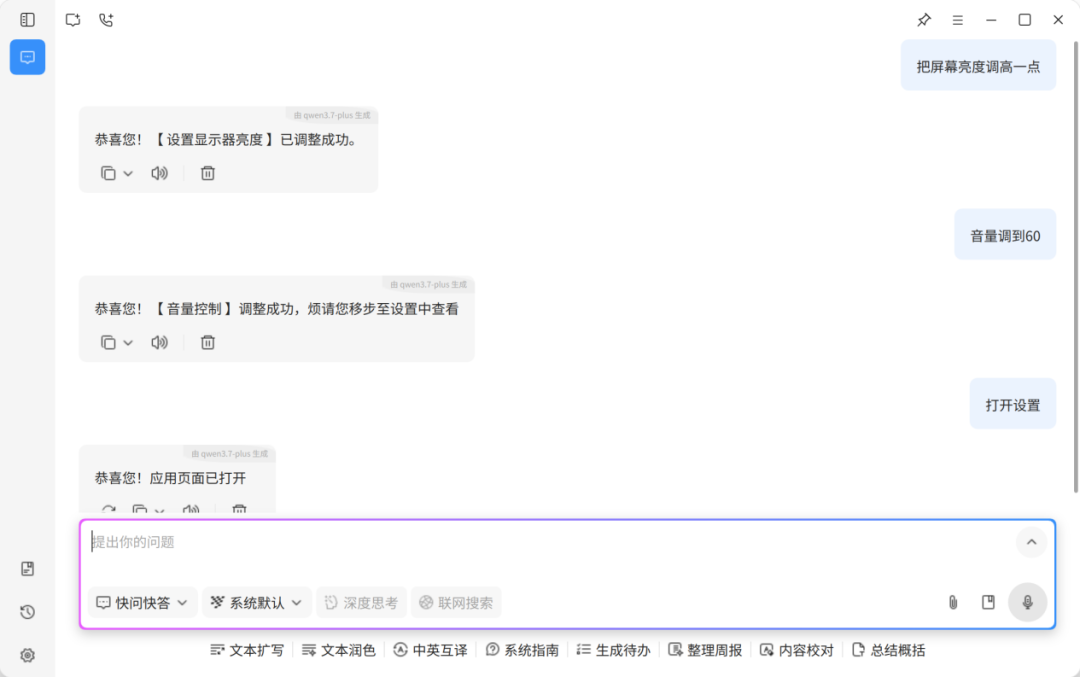
The system first determines what you want to do, then fills in the necessary details, completing everything in a single round of dialogue.
How to understand: Three-level progressive recognition
Turning a natural language sentence into an executable operation involves two core steps: first determine what the user wants to do (intent recognition), then fill in the information needed for the operation (parameter extraction).
kylin-ai-runtime adopts a three-level progressive approach, trying from lowest cost to highest cost in order, and stops at the level that yields a reliable result:
All three tiers share the same output format, so the upper-layer logic does not need to distinguish which tier the request came from.
The overall pipeline can be summarized as follows:

The reason for splitting into three tiers is that different expressions place very different demands on the system. Fixed phrasings use rule matching for the fastest and most resource-efficient handling; colloquial variants need semantic capabilities to cover their breadth; a few roundabout or elliptical expressions require a stronger model to complete. In essence, the three-tier approach matches the complexity of expressions with incrementally increasing costs, ensuring common commands are fast while obscure phrasings are not missed.
After Understanding: Confirm, Supplement, Then Execute
Intent recognition only answers “what to do”; most operations also need to know “to what extent.” For example, if the intent is to adjust the volume, what is the target volume?
The system defines acceptable values for each type of operation: the taskbar position is limited to left, right, top, bottom options; volume accepts “increase,” “decrease,” “maximum,” “mute,” and also supports numeric values from 0 to 100. When information is missing or ambiguous, the system will confirm first rather than executing based on a guess.
For example, if you say “help me adjust the volume,” the system will ask “to what level would you like to set it?” and only act after receiving a clear response. The entire interaction is a natural conversation; users don’t need to know about the backend tiered recognition or go digging through settings to flip switches.
How to Choose: Four Design Decisions
Several design choices during implementation are worth explaining:
Local-first. Key parts of the recognition pipeline can be completed on-device, independent of the network, and avoid sending user expressions to external services; whether to connect to the cloud is decided by the deployer.
Rules and models complement each other. Fixed expressions are matched to ensure stability and predictability; semantic retrieval and large models handle variations in phrasing. Both share the same output format, so subsequent processes do not distinguish which level the request comes from.
Configurable. Keywords, passwords, lists of actionable applications, prompts, etc. are stored in configuration files. Adjusting recognition behavior does not require code changes, making it easy for different distributions and community versions to adapt as needed.
Separation of recognition and execution. Recognition results need confirmation before an action can be triggered. The system remains restrained for uncertain requests, preferring to clarify first rather than rashly altering the system state.
How to participate
The system control capability definitions, recognition rules, prompts, and implementation code are all open-sourced with kylin-ai-runtime. Repository address:
https://gitee.com/openkylin/kylin-ai-runtime
Those who want to understand the implementation can start with the two modules of "Intent Recognition" and "System Operation Execution"; when you find inaccurate recognition statements during use, you can directly add rules in the configuration file and adjust commands to adapt to your own distribution or usage environment; you are also welcome to raise an issue or submit a PR in the repository, or join the AISubsystem SIG (AI Subsystem Special Interest Group) to participate in the construction of the openKylin AI subsystem.