

Kernel Leap, Intelligence Native - openKylin 3.0 Officially Released
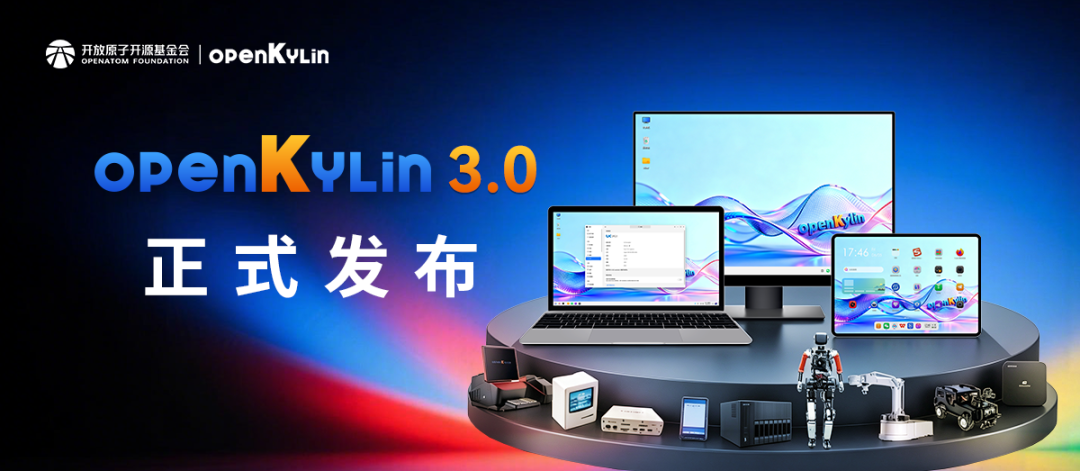
OpenAtom openKylin (hereinafter referred to as "openKylin") version 3.0 is officially released! In this version upgrade, openKylin has upgraded the system kernel across generations to Linux 7.0, completing the comprehensive iteration of over 180 core components; building an open foundation for intelligent agents, enabling AI to run through the entire system chain; innovating multimodal interaction such as air gestures, voice input, and screen reading; and expanding scenario coverage from smart desktops to mobile devices, servers, and other full-scenario applications.
The new version comes from the code and discussions of every community contributor. We sincerely invite all community developers and users to witness and experience it together!
Kernel upgrade, keeping pace with the frontier.openKylin 3.0 directly upgrades the system kernel from Linux 6.6 to Linux 7.0。GCC 15、glibc 2.42, LLVM 22, and JDK 25, with over 180 core components comprehensively upgraded around the new kernel. Core base libraries and compilation toolchains are aligned with the latest versions of international upstream communities.
Building a security defense line for the quantum era. This version integrates the three NIST post-quantum cryptography standards (ML-KEM, ML-DSA, SLH-DSA), enabling system-level invocation through the openHiTLS open-source cryptography suite, combined with the TPM trusted boot chain, to build a "chip-system" full-chain trust system—building the defense line in advance before quantum computing truly arrives.
Write more reliable systems with a safer language.The kernel layer supports Rust For Linux, allowing developers to write peripheral drivers in Rust; the first batch of system tools outside the kernel, such as wget and time, have been rewritten in Rust, reducing memory security vulnerabilities at the source.
Reaching more languages.This version adds 18 new languages including Korean, Thai, Arabic, Russian, German, Japanese, and French, welcoming users from more countries and regions to join openKylin.
Open foundation, the native soil for intelligent agent operation
openKylin 3.0 Integrating models, memory, tools, system permissions, and desktop capabilities into a unified architecture, providing a system-level runtime environment for intelligent agents—agents are not applications installed into the system, but "native residents" that directly invoke system capabilities.
Compatible and orderly, without walls
KylinBot、WorkBuddy、OpenClawMainstream intelligent agents such as and Raccoon Work can all run fully on openKylin 3.0. Agents directly invoke desktop capabilities through the MCP protocol without simulated clicks, achieving full-chain autonomous execution of "reasoning-decision-operation-feedback." Whether agents come from community self-development or third-party ecosystems, they all enjoy equal system capabilities and runtime environments in this version.
Open co-construction, a stage for developers
Developers can develop intelligent skills through the unified AI SDK, with one set of interfaces adapting to multiple large models; self-built skills can be submitted to the openKylin-skills repository, shared with global developers, forming an open ecosystem loop of "download and use, develop and share."
Release benefits: one trillion tokens free
After downloading and installing openKylin 3.0, open the pre-installed "Token Center" client, log in and bind your device, then check in daily to receive massive token quotas. Invite friends to participate and earn additional bonuses! AI is ready to use at startup, and mainstream intelligent agents such as KylinBot and OpenClaw are all available!
One gesture, one sentence, the system understands you
The brand-new UKUI 4.24 desktop environment extends human-computer interaction from keyboard and mouse to voice and air gestures—make a fist to take a screenshot, wave your hand to turn pages or adjust volume; global voice input lets you issue commands with a single sentence; swipe the edge of the touchpad to adjust brightness, volume, and progress with ease.
What you see, you can hear. System-level screen reading supports focus navigation and full-text follow-along, with finely adjustable speech rate and volume; KylinBot task results can be pushed to WeCom, Feishu, and DingTalk; AI operation results are displayed directly on the interface.
The details reveal refinement. The taskbar adds athree-island mode, where the data island, application island, and settings island are presented in separate zones without interfering with each other; at boot and unlock, dynamic wallpapers flow with a few seconds of light and shadow, awakening your exclusive workspace.
openKylin 3.0 supports four processor architectures from the same source: X86, ARM, RISC-V, and LoongArch. openKylin is one of the operating systems with the widest RISC-V architecture adaptation and the highest maturity, supporting the latest RVA23 standard. AI inference is optimized through RVV instructions, with FP32 scenarios accelerated 2 to 5 times and FP16 scenarios up to 36.5 times.
Scenario capabilitiesextend comprehensively from desktops to mobile and server ends—embodied intelligence adaptation for the "Linglong" humanoid robot, AI unmanned vehicles, and AI robotic arms; support for multi-architecture industrial hardware platforms such as ARM, LoongArch, and RISC-V; mainstream AI PCs and portable AI terminals like PocketClaw; high-performance versions for servers and workstations; and over 20 Docker application images covering AI, cloud computing, and big data.
openKylin 3.0 brings comprehensive upgrades from the kernel to the desktop, from the underlying architecture to AI capabilities, including the Linux 7.0 kernel, the native KylinBot intelligent agent, support for mainstream AI agents, the UKUI 4.24 desktop environment, Rust tool refactoring, open permissions for the Panshi architecture, and post-quantum cryptography mechanisms. The complete list of new features has been published in the Gitee repository, and you are welcome to review it.
https://gitee.com/openkylin/release-management/tree/master/openKylin-3.0/子文档/新增特性清单.md
openKylin 3.0 continues to improve the multi-architecture, multi-scenario hardware ecosystem, covering four major architectures: x86, RISC-V, ARM, and LoongArch. The hardware test compatibility lists for each architecture have been published in the Gitee repository, including compatibility test results for complete machines. The community also welcomes enthusiasts to participate in co-construction—if your device can install and run openKylin 3.0 normally, you are welcome to submit a PR to add your device information to the corresponding architecture list (such as brand model, CPU model, GPU, memory, storage, installation version, test results, etc.). Every contribution you make will help more users understand the hardware compatibility of openKylin 3.0!
- x86 hardware support list:https://gitee.com/openkylin/release-management/tree/master/openKylin-3.0/子文档/硬件测试支持清单/x86硬件支持清单.md
- ARM hardware support list:https://gitee.com/openkylin/release-management/tree/master/openKylin-3.0/子文档/硬件测试支持清单/ARM硬件支持清单.md
- LoongArch hardware support list:https://gitee.com/openkylin/release-management/blob/master/openKylin-3.0/子文档/硬件测试支持清单/LoongArch硬件支持清单.md
- RISC-V hardware support list:https://gitee.com/openkylin/release-management/blob/master/openKylin-3.0/子文档/硬件测试支持清单/RISC-V硬件支持清单.md
In response to known remaining issues from openKylin 3.0 Beta and issues reported during public testing activities, defect fixes have been made in areas such as system stability, covering multiple levels including the kernel, desktop environment, base libraries, and application components. The complete BUG fix list is continuously updated in the Gitee repository, and you are welcome to review and provide feedback.
https://gitee.com/openkylin/release-management/blob/master/openKylin-3.0/子文档/BUG修复清单.md
If you encounter any issues or have suggestions while using openKylin 3.0, please feel free to submit feedback via the openKylin mini program, the管家 problem feedback, or the Gitee repository!
Please note: some known issues are being fixed, so there is no need to submit duplicates. If you want a specific issue to be prioritized, you can comment "+1" under the corresponding Issue, which will help raise its fix priority. The full list of known Issues can be found at:
https://gitee.com/organizations/openkylin/issues?state=progressing
Method 1: Scan the QR code below or download the latest image from the openKylin official website (https://www.openkylin.top/downloads) to install (suitable for new users or users who want to reinstall the system);
Method 2: Go to System Settings—"Update" interface and follow the prompts to complete the system update (suitable for users who have installed the 3.0 Beta version);
Method 3: Run the following command in the terminal to update (suitable for developers):
Finally, we thank every openKylin community member for their tireless efforts and creative contributions. Every line of code, every commit, and every piece of constructive feedback in openKylin 3.0 embodies the collective wisdom of community developers, member organizations, university faculty and students, and the broader user base. It is this shared technical passion that drives openKylin forward. In the future, let us continue to work hand in hand and bring our ideas to life in the world of open source!