openKylin 3.0's first update is here - 150+ critical defect fixes
Today, the OpenAtom openKylin (hereinafter referred to as "openKylin") community officially pushes a new round of updates for openKylin 3.0. This update focuses on fixingnearly 150 critical defects discovered in community user feedback and internal testing before and after therelease of version 3.0, covering multiple key modules such as AI Assistant, Token Center, Software Store, System Updates, System Installation, Desktop Environment, Network Connection, and Hardware Peripherals. The overall experience and stability of the openKylin 3.0 version have been further improved.
Method 1: Download the latest image from the openKylin official website (https://www.openkylin.top/downloads) for installation (suitable for new users or users who want to reinstall the system);
Method 2: Go to System Settings - "Update" interface, and follow the prompts to complete the system update (suitable for users who have already installed the 3.0 release version);
Method 3: Run the following command in the terminal to update:
sudo apt update
sudo apt upgrade
Fix: In AI module management, the "Auto-load local voice model on startup" switch is off by default but still auto-loads, inconsistent with the expected state (IKBGLE)
Fix: AI Assistant (kylin-aiassistant) becomes unresponsive when executing tasks, and the main thread CPU is fully occupied causing a freeze (IK7RUR)
Fix: When clicking "Re-answer" while processing local files, a ghost image appears below the AI Assistant and then disappears (I9QXN6)
Fix: Incorrect English name for the AI Assistant version (IKDBST)
Fix: A large amount of untranslated content in the AI Assistant English mode (IKCJN4)
Fix: Voice dialogue does not follow along with reading during answer generation (I9JXTA)
Fix: User-reported blank dialogue area and empty model dropdown after Xiao K starts (IKAFQ8)
Fix: Adjusted the entry display of AI Assistant in the tray bar (IB5YKM)
Fix: In side-by-side and overlay modes, when dragging other apps into the AI Assistant and then closing the AI Assistant, the window positions of other apps shift (I9NMI0)
Fix: After creating a new schedule, the AI Assistant answer does not include a calendar hyperlink (I9K7HY)
Fix: Text dialogue lacks an insert function (I9IJ7M)
Fix: AI Assistant shortcut key startup does not work (I9HMWG)
Fix: The floating bar for selected text does not appear after selecting content in WPS PDF documents (IA707S)
Fix: When third-party apps have their own floating bar, the floating bars overlap when text is selected (I9SLXA)
Fix: Under Wayland environment, the focus does not follow clicks after selecting text, and selection does not take effect (I9S5S6)
Fix: After system update completion, TTS announces notifications in English, making them incomprehensible to users, and the related process remains resident, wasting resources (IK91FY)
Fix: Abnormal voice broadcast content during installation and first system entry (IKBD3E)
Fix: Pressing Win+C does not show a popup prompt when there is no sound input device (IK96Y6)
Fix: Supplemented the Token Center user manual (IKCF38)
Fix: After a missed check-in, the multiplier displayed for the next day is not 1.5x (IKBM8K)
Fix: When the system time is modified to be too early or too late, the check-in calendar is refreshed, and the checked-in status syncs to the modified date (IKBDXJ)
Fix: Occasionally shows "Already claimed today" when checking in, preventing check-in (IKBA1K)
Fix: Right-click function list of all input boxes in the application is displayed in English (IKBG8G)
Fix: The bottom of the Device and OS Information page shows the English "install_id" (IKB86B)
Fix: After the "Rules" text on the "Check-in" page, English is displayed (IKB7GY)
Fix: When not checked in, "Check-in" and "Home" pages do not show the multiplier (IKB7EY)
Fix: In the English environment of the Software Store, the Government Office zone still displays Chinese (IKCHBS)
Fix: The wps-office package in the Software Store is abnormal (empty package) (IKD5DD)
Fix: On loong64 architecture, without network connection, the store gets stuck at loading 0% (IKBQ9V)
Fix: Mobile application startup failure (IK92TK)
Fix: App Store installation stuck, always showing "Installing" (IK7NCE)
Fix: Store download of DeepSeek, Doubao and other software fails, error 0003 (IK7KCW)
Fix: Some store application installations stuck at 50% (IK7077)
Fix: No response when clicking installation package in store on loong64 architecture (IKBQ6J)
Fix: Mobile application KMRE environment initialization fails, prompting "Environment startup failure" (IJS1O0)
Fix: Newly installed software not present in uninstall list (IK92UU)
Fix: Remove unnecessary wishlist entry from client (IK92QJ)
Fix: Missing dependencies when installing Spark App Store (I77EKJ)
Fix: Abnormal installation/uninstallation of Kaiming package (IK9XOK)
Fix: Start menu, desktop shortcuts, taskbar cannot open Kaiming applications; command line also cannot launch under Wayland environment (I9O6RX)
Fix: sudo apt dist-upgrade update fails directly (IKB7IX)
Fix: Update backup files take up too much space; default backup partition on a 500GB hard drive can only hold one base image backup (IK7ZWC)
Fix: Update backup unavailable; no backup point under /backup directory after update backup (IKBHYB)
Fix: Data tracking related data not reported (IKBN04)
Fix: Data tracking DATA5 data adds three new entries every boot (IKA8AB)
Fix: Shutdown installation related content not configured in config package (IKBI8E)
Fix: Prompt "init framebuffer Permission denied" when installing system and entering system (IK9C56)
Fix: After installation using "Create user later" method, unable to enter OOBE interface, directly shows login screen (IKAUFN)
Fix: Error information exists in tty during installation interface (IKAU8Y)
Fix: Background wallpaper not updated to new version 3.0 during installation (IKANI8)
Fix: Unable to pass encryption authentication after full disk encryption installation (IKAUEH)
Fix: Boot error after grub boot on some models (IKCAU1)
Fix: Grub boot interface background wallpaper not updated to new version 3.0, logo before boot entry incorrect (IKDR73)
Fix: Welcome interface content not updated for first-time installation (IKB02R)
Fix: No animation for default wallpaper on ARM architecture (IK9SWX)
Fix: Control panel crashes when clicking "Settings - About" (IB9TKP)
Fix: Issues with three-finger swipe up/down gesture combination (IB7NEN)
Fix: System shortcut key list does not include window management shortcuts (IB7KBP)
Fix: Left/right keyboard keys do not work on workspace thumbnails in multitasking view (IBBKDE)
Fix: Password hint missing on change password interface (IB6WOI)
Fix: No security question button on login options interface (IBBPI0)
Fix: Remove newly added blank theme from system (IBDHG1)
Fix: Right-click uninstall software in menu bar shows one popup each in Chinese and English (IK7NSB)
Fix: Desktop picture plugin's set image becomes invalid after system restart (IK7SQN)
Fix: Screensaver flickering (IK95YS)
Fix: Image copied from webpage displays abnormally in clipboard (IK88L0)
Fix: Switching multi-screen display modes or toggling the monitor shows no visual change in NVIDIA standalone GPU environment (IK8BYA)
Fix: Main screen desktop displays abnormally and desktop icons disappear when connecting dual HDMI screens (IB69J7)
Fix: Qt Creator crashes during operation on kylin-wlcom (IK8T4M)
Fix: Desktop displays abnormally after logging out or reconnecting an extended screen with dual screens connected (IB6SAW)
Fix: External wireless network card not recognized (I73GWF)
Fix: Slow wireless network connection on ThinkPad X280; network disconnects and does not automatically reconnect after closing and reopening the lid (IKEDNX)
Fix: Unable to turn on mobile hotspot (IK8IEU)
Fix: Integrated StrongSwan VPN connection support (IK8XG3)
Fix: Integrated OpenVPN connection support (IK8XFW)
Fix: Integrated L2TP VPN connection support (IK8XF9)
Fix: Phone fails to send files to computer via Bluetooth; no reception popup appears on the computer (IK98QS)
Fix: When two computers send files via Bluetooth connection, the receiving end does not show an accept button (IK9886)
Fix: Settings crashes when clicking the "Remove" option for a Bluetooth device in the control panel (IBDMD7)
Fix: Incorrect input/output check status when connecting a 3.5mm headset; output volume display inconsistent with actual volume; adjusting volume and channel balance does not take effect (IK8TMW)
Fix: When connecting multiple headsets, the input/output device with the highest priority is not automatically checked; the selection state does not follow when switching devices (IK8TSN)
Fix: ukui-audio-service repeatedly crashes after boot; taskbar volume and sound settings become unavailable (IK8VPS)
Fix: When editing an input method on the keyboard page in settings, the prompt "Please install input method framework fcitx5" incorrectly appears (IK8GZM)
Fix: Clicking "Show files and exit" after decompressing in the archive manager does not open the corresponding folder (IK9SYG)
Fix: gif and apng format images can be rotated in the image viewer, inconsistent with the right-click behavior in the file manager (IKCLG6)
Fix: On the loong64 architecture, clicking the close button in the top-right corner of the file manager fails to close the window (IKBQ0C)
Fix: Right-clicking a data disk in the file manager sidebar and selecting "Open in new tab" does not respond (IB6R0W)
Fix: Clicking a data disk in the sidebar does not enter the /data/usershare directory (IB6QYQ)
Fix: When adding a plugin to the file manager, it is positioned relative to the top-left corner of the screen, pushing away icons in the top-left corner (IK96T4)
Fix: On the loong64 architecture, clicking "Open file" or "Open folder" in the music application does not respond; the close button in the top-right corner is ineffective (IKBQ60)
Fix: Double-clicking a gif format image or right-clicking to open with the image viewer causes the application to crash (IKCLME)
Fix: Unable to adjust volume in the media player (IKA9MY)
Fix: The maximize button in the media player does not support edge snap functionality (IK9SBZ)
Fix: The popup for opening a URL in the media player is not displayed on top (IK9RLL)
Fix: The title bar is still displayed when playing videos in full-screen mode in the media player (IK9S19)
Fix: No thumbnail appears when hovering the mouse over the progress bar in the media player (IK9RI6)
Fix: Clicking the volume bar in the media player only allows slight movement, not directly jumping to the clicked position (IK9DHP)
Fix: The sidebar buttons in the media player are not displayed when hovered (IK9DFR)
Fix: Extra underline below the text of "Open Folder" in media player right-click menu (IK993F)
Fix: Checkbox checkmark in media player is not clearly visible (IBFHTO)
Fix: Camera crashes when switching cameras (IK9I96)
Fix: Intel 9a78 integrated graphics does not support screen horizontal/vertical rotation (IK9E7X)
Fix: Screenshot area limited in KYLIN-WELCOME mode (IK8CRZ)
Fix: In multi-screen scenario, only the primary screen can be captured, not the secondary screen (IK7S5Q)
Fix: Screenshot options page top-left icon not updated after changing system theme (IB6ENF)
Fix: Screenshot shortcut keys page top-left icon not updated after changing system icon theme (IB6EH2)
Fix: Using apt to install gparted in terminal causes loss of key system components and inability to log in; installing gparted from the app store stalls (IK8BN9)
Fix: libxatracker2 dependency libllvm20 (>= 1:20.1.0) cannot be installed (IKDCTC)
Fix: gnome-terminal dependency not satisfied, cannot install (IJS83T)
Fix: Python development environment issues: anthropic installation fails, pip3 is restricted, venv is unavailable (IKA3JS)
Fix: Installation of libvirt-daemon-system fails, supplement missing mdevctl dependency (IK7TK0)
Fix: apt install npm dependency resolution deadlock (npm and node-rimraf version conflict) (IK7RRO)
Fix: Dependency error preventing installation of libvirt-daemon-system (IK7QTF)
Fix: Update webkit2gtk-4.1 dependency version to resolve missing dependencies when building tauri+pnpm applications (IKBQG2)
Fix: ARM architecture cannot wake up after sleep (IK9Z4N)
Fix: ARM architecture power button has no response (IK9YUE)
Fix: When no swap partition is created during system installation, the default low battery action in power settings is displayed as empty (IK8RRS)
Fix: ServiceSupport page in Kylin Assistant contains a lot of Chinese in English environment (IKCHCC)
Fix: Disk usage analyzer fails to open (IK9I5C)
Fix: Kylin Assistant disk usage analyzer download fails (IK8SX9)
Fix: Hardware information page displays many duplicate mouse information entries (IK8TJ5)
Fix: After reporting an issue via Kylin Assistant, submitting the next issue without closing the page shows a submission failure message (IK7NDN)
Fix: When downloading with apt/wget in the terminal, dragging to resize the window generates a lot of duplicate progress bars (IK6EDL)
Fix: Right-click paste and top navigation bar paste not working in terminal (IK7R3Y)
Fix: Fingerprint authentication unavailable on all authentication entry points (IK9QMG)
Fix: Discs cannot be recognized after burning DVD-RW and DVD-R disc images (IK9VT3)
Fix: Scanning app crashes on launch (IK9JBR)
Fix: Printer search dialog position is not fixed (IB62B2)
Fix: Abnormal rtc device check (IKDBRJ)
Fix: Clicking the book transfer icon in the drawer does not open Kylin Book Transfer (IB6D7F)
Fix: System login time increases after installing the zenity component (IKFNTU)
Fix: Failure to stop or start service error (IK7QKY)
Fix: On loong64 architecture, system monitor and other apps cannot be closed by clicking the close button in the upper right corner or right-clicking on the taskbar (IKBQ3J)
Once again, thank you to all community users who participated in reporting issues for openKylin 3.0. Every piece of feedback helps make openKylin better and is our motivation to continuously optimize the product experience. If you encounter any issues during use, please feel free to continue submitting Issue feedback through channels such as the Gitee project repository, Kylin Manager, mini programs, and community forums. We will follow up and handle them promptly!
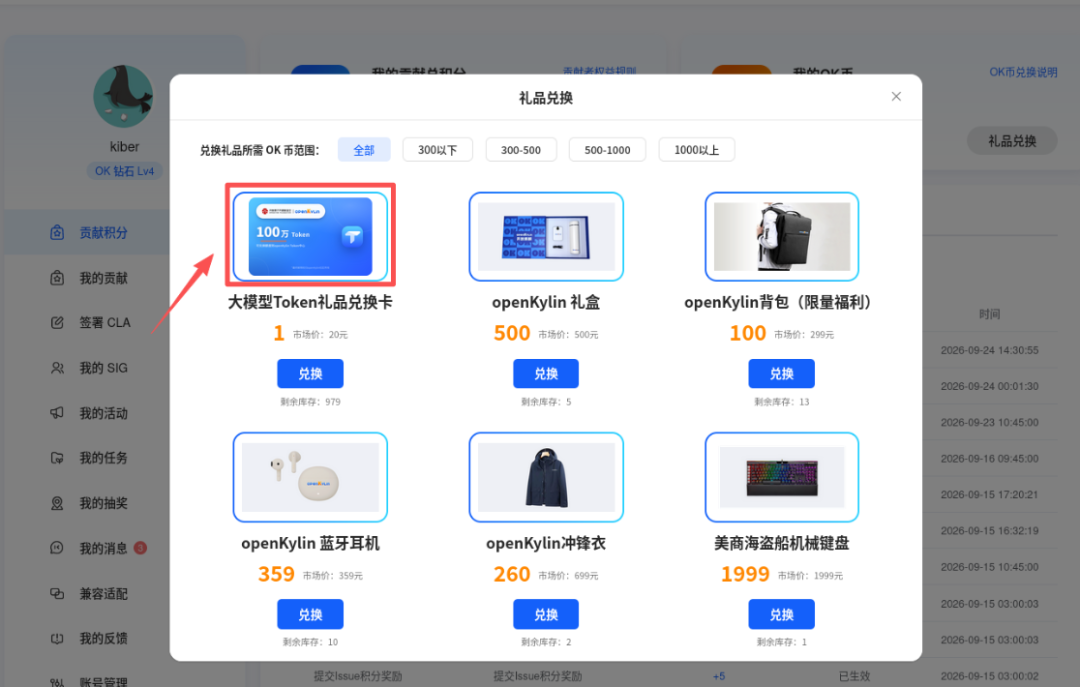
In addition, the openKylin community gift redemption platform has also been launched for youToken quota redemption cardEvery contribution point you earn from submitting feedback can be exchanged for quota in the Token Center. Come and experience it!