

New arrivals at openKylin Token Center! 5 popular large models free to use

After the release of openKylin 3.0, agents have become a feature many users rely on daily: KylinBot, OpenClaw, WorkBuddy, Raccoon Work... No matter which agent you prefer, they all depend on one thing — large models.
Good news: the model list in the openKylin Token Center has been updated, adding support for 5 popular large models at once, including new versions from the Tongyi Qianwen and DeepSeek series,all accessible by daily check-in at the Token Center to get free tokens.!
The newly added models range from lightweight fast-response to flagship strong reasoning, so you can choose based on task needs:
Model Name | Series | Positioning | Suitable Scenarios |
qwen3.8-max | Tongyi Qianwen | Latest flagship, strongest overall capability | Complex reasoning, long-form writing, code development |
qwen3.7-max | Tongyi Qianwen | Previous generation flagship, mature and stable | Daily main usage |
qwen3.7-plus | Tongyi Qianwen | Lightweight, fast response | High-frequency daily Q&A, lightweight tasks |
deepseek-v4-pro | DeepSeek | Flagship, strong deep reasoning | Technical analysis, solution design, complex tasks |
deepseek-v4-flash | DeepSeek | Lightweight and fast, low latency | Lightweight tasks, high-frequency calls |
Quick summary: For the "most powerful brain," choose qwen3.8-max or deepseek-v4-pro; for speed and ease of use, deepseek-v4-flash and qwen3.7-plus are always at your service.
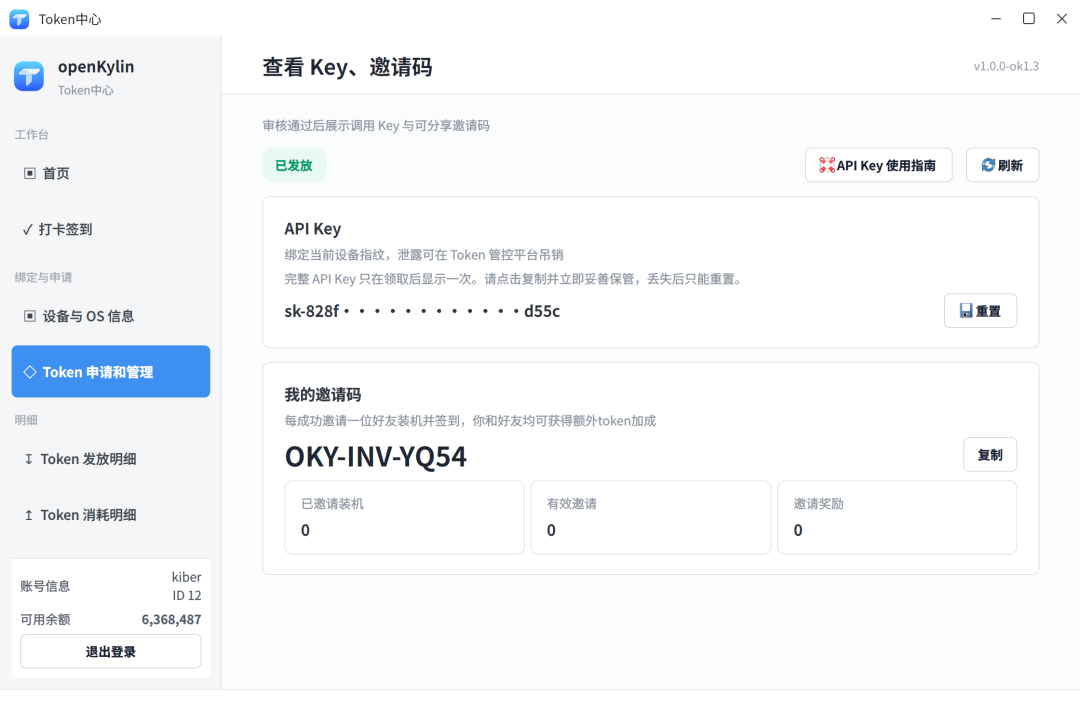
After downloading and installing the openKylin 3.0 system, open the Token Center client, go to the "Token Application and Management" page, apply for approval, then click "Get API Key." Note:The complete Key is displayed only once when retrieved; subsequent pages only show the prefix, so remember to copy and save it immediately.
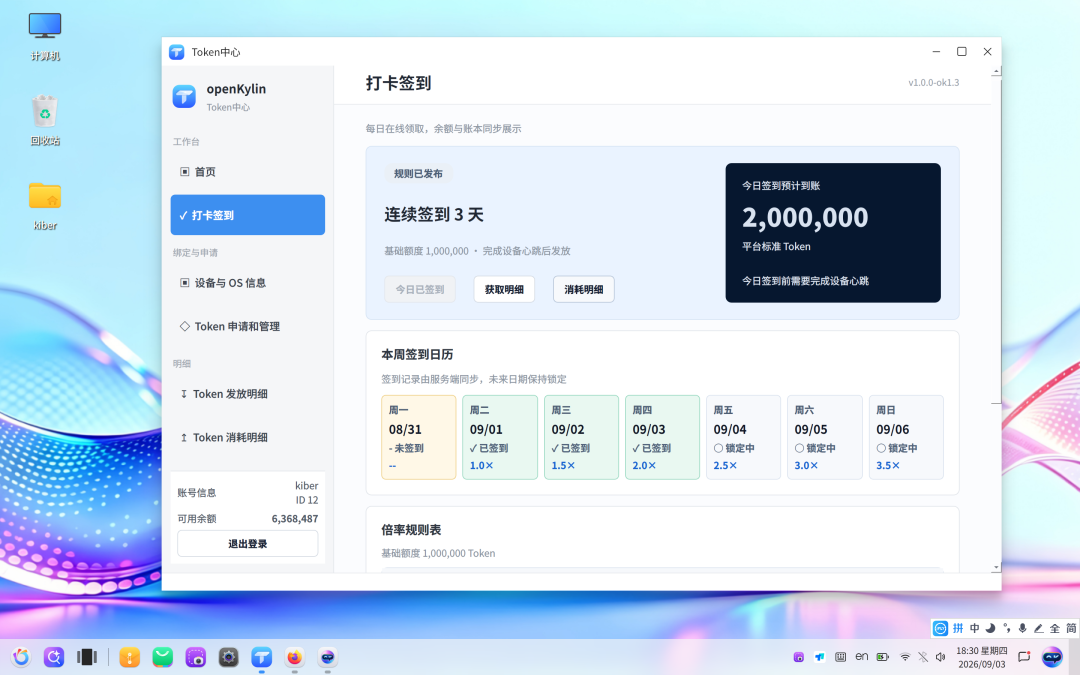
After successfully obtaining your Key, switch to the check-in page. Complete daily check-in, and the free token quota will be automatically credited to your account, deducted when calling models. Keep checking in daily to accumulate quota, usable for daily agent conversations and development debugging; users who already have a Key can just check in directly.
Select the model you want to configure and fill in the model field with the model name from the table above. The openKylin Token Center is fully compatible with the OpenAI interface protocol, so mainstream agents and tools like KylinBot, WorkBuddy, OpenClaw, DeepSeek Harness, Codex, Claude Code can all connect directly. The request address is:
https://llm-gateway.openkylin.top/v1/chat/completions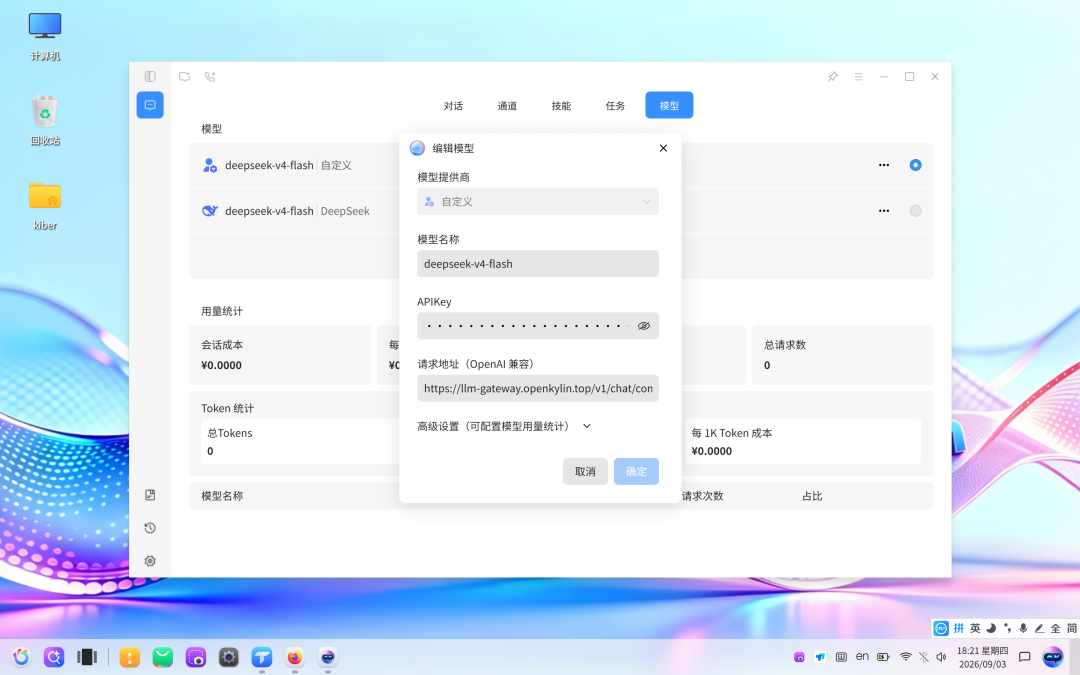
For detailed configuration steps (including screenshots) for each client, click "Read the Original Article" to view the "openKylin Free Token Integration Guide" document — get it done in minutes!
Note for users already using the Token Center:Just update the model field to the new model name from the table above; the Key and other settings remain unchanged.
The openKylin community will continue to provide free token quotas to all users, and the model list will keep expanding. If you encounter any issues during use, feel free to give feedback on the openKylin community forum or Gitee repository; if there is a specific model you wish to have integrated, you can also submit a request in the community, and we will do our best to arrange it! Now open your openKylin 3.0 system, pick a model that suits you, and get your agent running!
-
openKylin Community August 2026 Operations Report[2026/09/08]
-
openKylin appears at the 2026 IC WORLD Conference to jointly explore RISC‑V computing power ecosystem construction.[2026/09/20]
-
Gathering momentum in Central Plains! openKylin Community Member Salon Zhengzhou Station sets sail, jointly building a new ecosystem of open-source operating systems.[2026/09/18]